
Built to be right, and honest when it can't be.
Every feature in PermitLogic AI serves one idea: show you the rules from your own town, tell you where each came from, and say plainly what's missing.

Town rules first, and the ladder behind them.
The rules for your project live in layers. Sully reads the closest layer first and only falls back when it has to.
This works for any U.S. town. Results depend on what each town publishes, so every rule tells you which layer it came from.
- TownOfficial site, permit, fee, code and zoning pages, handouts and forms. Your own pasted links are read first.
- CountyInspections, stormwater, health or planning functions a town defers to its county.
- StateThe adopted statewide code, licensing rules and statewide programs.
- Model codeThe final fallback, linked or paraphrased. Model code text is copyrighted, so it's never pasted.
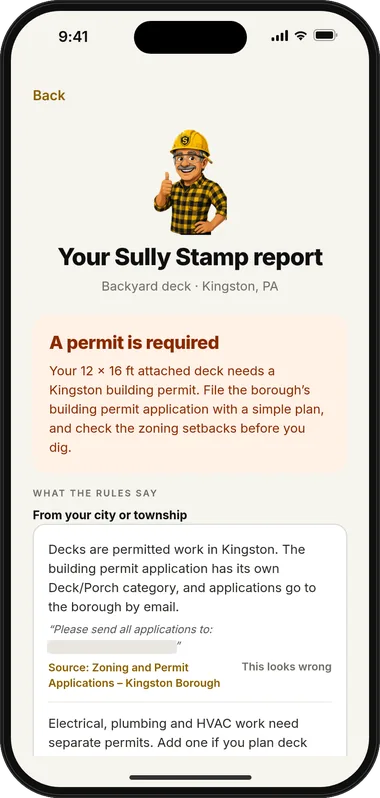
Decks attached to a dwelling require a building permit and zoning review.
Honest about gaps.
If a rule can't be found, the report says so. It may show a labeled county or state rule, and it tells you who to call and what to ask.
- Checked detailsPhone numbers, fees and quotes are checked against the pages Sully read.
- No invented numbersA missing fee stays missing. You'll see it called out, not filled in.
“This looks wrong” on every rule.
You might know something the website doesn't: a newer ordinance, a handout from the counter, a conversation with the zoning officer. One tap flags the rule so you know to confirm it before relying on it.
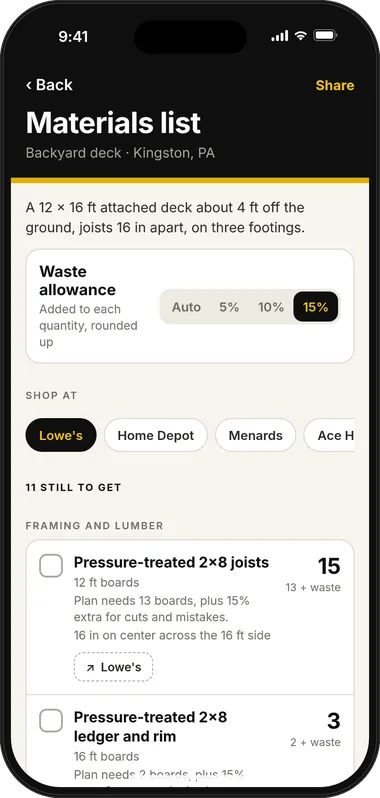
A materials list with a waste allowance.
Sized only from confirmed details, so the numbers mean something.
- Waste allowanceEach line includes extra for offcuts, defects and mistakes, and shows how much.
- AssumptionsSpacing, coverage and sizes the math relied on are written beside each item.
- Missing measurementsCalled out by name, with what to measure, never guessed.
- Store searchA retailer picker turns each line into a plain store search at the retailer you pick.
Store links are ordinary searches today. If we ever join a retailer's affiliate program, this disclosure will sit next to the links: “If you buy through these links, PermitLogic AI may earn a small commission at no extra cost to you.” Affiliate disclosure
A filing packet, ready for the office.
One PDF with a cover sheet, your details, the rules with sources and a checklist of what the office asks for. Email it from the app.
- Cover sheet with owner and property details
- Project details and schematic from your sketch
- Rules that apply, each with its source
- Checklist of what the office asks for
- Link to the town's own application form

,_signed_Moore_and_Munro,_1912-1913.jpg)
Real forms, linked when posted.
When your town posts its own application form online, the report and packet link straight to it. No look-alike forms, no guessing which version is current. If the town doesn't post one, the report says so and tells you how to get it.
Sketch to schematic.
Photograph a rough drawing. Sully turns it into a clean conceptual schematic: the house, the new work, your dimensions and the distances that matter, with missing ones called out.
Conceptual means conceptual: it's not a survey or a stamped drawing, and some towns require one from a licensed pro. It's a great way to see your project clearly and start a better conversation with the office.
Denial recovery.
Application sent back? Take a photo of the letter or paste its text. Sully explains each reason in plain words, matches it to your town's own sources, and lays out the fix and the way back in.
Included with a Sully Stamp for that project, or with Sully Pro.
- Every reason coveredOne entry per reason, in the order the letter lists them, with what it means and what to change.
- Sourced, not guessedQuotes come word for word from your letter or your town's pages. Deadlines and appeal rights are never invented.
- A checklist to work throughOrdered next steps you can tick off, plus the questions worth asking the office by phone.
- Honest about prosIf a fix needs an engineer, architect or licensed trade, Sully says so.
Your links, read first.
Got a link from the zoning officer, or a PDF handout from the town's site? Paste it in. Sully reads your links before anything else and labels what came from them.
- OrdinancesZoning and building ordinances your town has posted.
- HandoutsDeck, fence, shed and pool guides many towns publish.
- Fee schedulesSo fees in your report come from your town's page.
- FormsThe application your office actually uses.
Also on the list.
More in the iPhone app, and what's in the works.
- Sign inSign in with Apple or Google to keep your projects.
- Offline handlingThe app copes gracefully when the signal drops at the job site.
- Hire a proComing soon: connect with local pros from inside the app. Details
- Shareable packet linkPlanned: share a packet with a link instead of an attachment.
- Professional modePlanned for contractors. Details
Get Sully on day one.
Coming soon to iPhone. Tell us what you're planning and we'll send one email when Sully is ready. We read every project note, and it shapes which project types we polish first.